Airbnb Instant Book: What It Does and Whether to Enable It
Instant Book lets guests reserve your Airbnb without waiting for your approval. It’s one of the few listing settings Airbnb directly rewards with better search placement — and one of the most commonly misconfigured ones. Here’s how it works, what it costs in terms of guest control, and the settings that make it safe to turn on.
Last updated:
Not sure which settings are limiting your listing?
Get your listing diagnosisQuick Answer
Instant Book is worth enabling for most hosts. Airbnb actively boosts Instant Book listings in search, and hosts who configure guest requirements correctly see comparable booking quality to Approve all bookings — without the conversion drag of an approval delay. The risk isn’t Instant Book itself; it’s turning it on without setting any requirements.
How Instant Book Works
Airbnb has two booking modes. Approve all bookings requires a guest to send a request, wait for you to review their profile, and then receive your approval — a process that typically takes hours and often causes guests to book elsewhere. Instant Bookremoves that wait. Guests who meet your requirements can complete a reservation immediately, the same way they’d book a hotel.
The distinction matters more than most hosts realize. When a guest searches Airbnb and filters for “Instant Book,” listings set to Approve all bookings disappear from results entirely. That filter is used heavily on mobile — and the guests most ready to commit often use it precisely because they don’t want to wait.
Instant Book on
Guest completes reservation immediately. No approval needed. You receive a booking notification.
Approve all bookings
Guest sends a request. You have 24 hours to accept or decline. Guest may book elsewhere while waiting.
How Instant Book Affects Your Search Ranking
Airbnb’s algorithm favors listings that convert — guests who click and then book. Instant Book lifts conversion by eliminating the approval delay that causes guests to abandon. This creates a compound effect: more bookings improve your conversion rate, which improves your ranking, which gets you more impressions.
Airbnb also surfaces Instant Book listings preferentially in certain search contexts. Guests searching with short lead times — booking for this weekend, this week — disproportionately use Instant Book filters. Hosts who are off at peak-demand moments lose bookings to listings that are on.
The ranking impact is real but secondary to listing quality. A strong title, a compelling cover photo, and complete amenities still drive the most impressions. Instant Book amplifies a well-positioned listing. It doesn’t rescue a weak one.
For a full picture of how Airbnb weighs ranking signals:
Airbnb SEO Guide →The Trade-off: More Visibility vs. Less Guest Screening
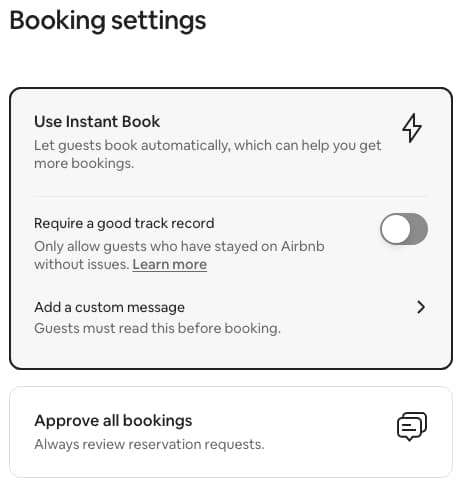
The main reason hosts hesitate on Instant Book is the loss of manual guest review. With Approve all bookings, you read every profile before accepting — you can see their reviews, verification status, and how they’ve communicated. With Instant Book, the booking happens first. Your screening is done upfront through the “Good track record” filter and a pre-reservation message, not case-by-case approval.
Approve all bookings — what you control
You review each request manually before accepting. You can see the guest's full profile, review history, and verification status. You have 24 hours to accept or decline. You can also require a profile photo via your listing's Guest requirements settings (this applies regardless of booking mode). The trade-off: guests often book a competing Instant Book listing while yours is pending.
Instant Book — what you control
Automated filtering via the "Good track record" requirement (optional) plus a pre-reservation message with questions guests must answer before the booking confirms. Airbnb handles identity verification at the platform level — it's built into every booking automatically.
For hosts who rent out a primary residence or want personal confidence in every guest, Approve all bookings makes sense. The ranking cost is real but so is the peace of mind. For dedicated rental properties where screening through automated requirements is sufficient, Instant Book is the better default.
Who Should Enable Instant Book
New listings
EnableYou need early bookings to build review history. Instant Book removes the approval delay that causes guests to move on when you have no social proof yet. The first 10–15 bookings are the most important — don't make guests wait for them.
Dedicated rental properties
EnableIf you're not sharing your primary residence, the risk profile of unknown guests is lower. Set requirements, configure your house rules, and let the bookings come in.
Hosts in competitive markets
EnableWhen your market has multiple similar listings at comparable price points, conversion speed determines who gets the booking. A guest comparing two equivalent options books the Instant Book listing because it's simpler.
Hosts sharing their primary residence
Consider carefullyRoom-share hosts often prefer to screen guests personally before approving. The conversion drag of manual review is real, but so is the value of feeling confident about who is in your home.
Hosts who've had significant guest issues
Consider carefullyIf a previous difficult guest slipped through, manual review can restore confidence. The compromise: enable Instant Book with maximum requirements rather than disabling it entirely.
Settings That Reduce Risk Without Losing the Ranking Boost
What Airbnb Verifies Automatically — Before Any Host Settings Apply
Since 2023, Airbnb requires identity verification for every booking, regardless of whether you use Instant Book or Approve all bookings. The process is tiered: Airbnb first checks a guest’s personal information (name, address, phone) against trusted third-party databases. If that’s not sufficient, it requests a government-issued ID — a driver’s license, passport, or national identity card — and in some cases a selfie for photo matching.
Airbnb handles identity verification at the platform level — it’s built into every booking automatically. Not every guest will be asked for a government ID (some verify through personal info alone), but every guest goes through some form of identity check before a booking can complete. Airbnb is transparent that the process isn’t perfect and doesn’t guarantee someone is who they say they are, but it meaningfully raises the barrier for fraudulent or anonymous accounts.
On top of that platform baseline, Airbnb gives hosts two tools to screen guests when Instant Book is on: a guest requirement and a pre-reservation message.
Require a good track record
The only guest filter Airbnb currently offers for Instant Book. A guest clears this bar if they've completed at least one prior Airbnb stay with no incident reports or host complaints on file. Airbnb calculates it automatically — you're not setting a review count or star threshold yourself. One important caveat: a guest with zero written reviews can still pass this filter if they've completed a stay and no complaint was filed. It screens out brand-new accounts and flagged guests, but not first-time users who've stayed quietly.
Pre-reservation message
Set up an automated message with specific questions guests must respond to before the booking is confirmed. This is your main qualitative screen when Instant Book is on — use it to ask about group size, purpose of stay, or anything that would normally come out in a manual review. A guest who ignores the message or answers evasively gives you grounds to contact Airbnb support about cancellation.
The Honest Limitation of “Good Track Record”
Enabling “Good track record” does not mean guests must have positive reviews. It means they’ve completed a stay with no incident filed. A first-time user who stayed once, left no impression, and received no review from their host still qualifies. The filter reliably blocks flagged guests and brand-new accounts — but it’s a lower bar than many hosts expect.
The pre-reservation message is the better tool for qualitative screening. Use both together: the track record filter removes the highest-risk accounts automatically, and the message surfaces intent and communication quality before the booking locks in.
Instant Book is one signal among many — here’s what else moves your ranking:
Why Your Listing Gets No Views →About This Guide
This guide is written by Selah Collective, a short-term rental consultancy that audits and optimizes Airbnb listings for hosts. The observations here are drawn from Selah’s analysis of STR listing performance patterns and Airbnb’s published guidance on how their algorithm weighs booking settings. Selah is not affiliated with Airbnb.
Not Sure Which Settings Are Holding You Back?
The Selah Score™ audit benchmarks your listing against top earners in your market across five performance pillars — including conversion and booking settings — and delivers a prioritized action plan.
Frequently Asked Questions
Does Instant Book improve your ranking on Airbnb?
Yes. Airbnb's algorithm favors listings with Instant Book enabled because they deliver a frictionless guest experience — no waiting, no host approval delay. Listings with Instant Book on appear in filtered Instant Book searches and typically receive more impressions than comparable listings set to Approve all bookings.
Can you decline a guest who books with Instant Book?
Technically yes, but it costs you. Declining an Instant Book reservation counts against your acceptance rate, which Airbnb tracks as a ranking signal. The better strategy is to use guest requirements — verified ID, positive review history, no negative reports — to filter before the booking is made rather than declining after.
What requirements can I set for Instant Book guests?
Airbnb gives hosts two settings when Instant Book is on: 'Require a good track record' and a pre-reservation message. The good track record filter passes guests who have completed at least one prior stay with no incident reports — it blocks flagged guests and brand-new accounts, but not first-time users who have stayed quietly without a review. The pre-reservation message lets you ask specific questions guests must answer before the booking confirms, which is your main qualitative screen.
Should a new listing enable Instant Book?
Yes. New listings need early bookings to build review history, and Airbnb's algorithm rewards new listings that generate conversions quickly. Instant Book removes the approval delay that causes guests to move on — which is especially costly when you have no reviews yet to anchor trust. The first 10–15 bookings set your ranking trajectory; Instant Book accelerates getting there.
Are bad guests more likely to book with Instant Book?
Not if your requirements are configured correctly. Hosts who enable Instant Book with the good track record requirement enabled report similar guest quality to those using Approve all bookings. The risk comes from Instant Book with no requirements set — not from Instant Book itself.
Can you toggle Instant Book on and off without affecting your listing?
Yes. Instant Book is a listing setting you can change at any time without affecting your listing status or review history. Turning it off removes you from Instant Book filters and typically reduces impressions within a few days. Turning it back on restores that visibility quickly.
Ready to see how your listing compares?
Get a complete audit of your listing — title, photos, amenities, pricing, and more.